You can check out the rest of our tools, like iOS Sideloading Certificate Checker, MobileProvision and MobileConfig checkers here.
Why blobs matter, and why iOS 16 changed everything
Apple only lets you install a version of iOS that it is currently signing. The moment they stop signing a version, the normal install path for it closes.
A blob, also called an SHSH, is a saved copy of Apple’s signature for one specific device, and the whole point of saving them is to keep a door open to a version after Apple has walked away from it. For years that was the downgrade lifeline.
Save your blobs, wait, and when you wanted off a bad version you had a way back.
Then iOS 16 arrived and quietly rewrote the rules with a component called Cryptex1. A lot of people are still saving blobs the old way and assuming they are covered when they are not.
This tool exists to look at your actual blob and your actual device and tell you the truth: what it is, what it can restore, and what it is missing.
This guide is the background behind that verdict.
What is actually inside a blob
The core of a blob is the AP ticket, stored as ApImg4Ticket. It is an Image4 manifest (IM4M), a signed structure that lists cryptographic digests of every firmware component your device is allowed to boot: the kernel, iBoot, the boot chain, the Secure Enclave firmware, and so on.
First, it is locked to your device by ECID, the unique chip identifier, so a blob for one device is useless on any other. Second, it is bound to a nonce, and that nonce is where downgrades live or die.
The checker reads that manifest directly. Your ECID, chip, board ID, and even the build come out of it.
The build is stored in a manifest property, so a blob for build 21H312 announces itself as exactly that, and the tool pairs it with the version from the file name when your saver put it there.
Nonces and generators
A nonce is a number used once. Apple mixes it into the signature so you cannot simply replay an old blob later.
The device generates the nonce by taking a seed, called the generator, and hashing it. That is the useful part: if you boot with a generator you chose, you get a nonce you can predict, so a blob saved against that nonce becomes reusable.
This is why the community standardized on a couple of well known generators.
0x1111111111111111 default (on unc0ver, palera1n, checkra1n, etc)
0xbd34a880be0b53f3 Electra, Chimera, Odyssey default
Code language: Bash (bash)
The tool recognizes both and labels them, so if your blob shows one of these you know it was saved to be reusable rather than with a random throwaway nonce.
On newer chips it is not that simple. Starting with the arm64e devices, meaning A12 and later, Apple added nonce entangling.
Before hashing, the generator is encrypted with a key that is unique to your individual device, so the resulting nonce cannot be computed on a laptop. It only exists on that one phone.
To save a reusable ticket on those devices you have to read the real entangled nonce off the device itself. And as we will see, the Cryptex1 seed gets entangled even on A10 and A11.
Mind the SEP gap. No, but really…
Two processors are signed inside that same AP ticket. AP is the Application Processor, the main chip. SEP is the Secure Enclave Processor, the security chip, you know, the FaceID, Passcode, TouchID thing, amongst others.
The AP nonce you can steer with a generator. SEP has no equivalent, no way to set its nonce, so a SEP downgrade depends entirely on whether the SEP version you want is compatible with the one you are coming from.
SEP compatibility is the reason a downgrade that looks possible on paper still fails, and it is a recurring theme below.
What iOS 16 broke: Cryptex1
Cryptex1 is a firmware component Apple introduced in iOS 16, technically a virtual coprocessor, built so they could ship Rapid Security Responses separately from full updates. It carries the dyld shared cache and most of the system libraries.
For our purposes the important facts are these: Cryptex1 has its own signing ticket and its own nonce, separate from AP, and that nonce is derived from a nonce seed. There is no known way to persist those seeds across reboots.
On top of that, a newer Cryptex1 is almost never compatible with an older iOS, because of everything it carries.
Put together, that means a saved AP blob on its own no longer downgrades an iOS 16 or newer device.
You also need a Cryptex1 blob, and its nonce shows up in the cryptex ticket as the cnch property. And there is a hard gate around all of it: using cryptex blobs at all requires checkm8.
If your device has no bootrom exploit, this door is closed and locked. You can still save the blobs because you never know. Nobody expected the new usbliter8 BootROM exploit for A12 and A13, yet here we are in 2026…
So can you actually downgrade? The straight answer by chip
This is the question the tool answers for your specific blob, and here is the logic behind it.
A12 and later
For A12 and A13, the new usbliter8 BootROM exploit could be useful for downgrades. It’s as capable as checkm8. SEP will still be problematic, so assume tethered for now.
No public bootrom exploit for A14+, which means no cryptex blobs, which means no downgrade. The nonce seeds cannot be persisted and the whole mechanism is off limits. This is dead outside same generation patch moves, like 16.3 to 16.3.1.
A11
checkm8, but with no SEP exploit. SEP cannot be moved backward, so it has to stay current. That restricts you to moving only between SEP compatible versions, using your saved Cryptex ticket.
Before attempting anything, check a SEP compatibility chart for your target.
A9, A9X, A10, A10X
These are checkm8 and are on the SEP exploit track, the community effort centered around Cryptiiiic and dora2ios.
With a complete blob, meaning both the AP and Cryptex1 sides, these chips can have SEP and Cryptex restored to arbitrary versions.
This is the group with real downgrade hope. The tooling to actually perform the restore was still being finished at the time this was written, so treat it as emerging rather than guaranteed.
A7 and A8
Pre Cryptex era, these top out well before iOS 16. Classic AP ticket downgrades apply, and these chips also support reliable DFU nonce collisions, a separate route in that needs no saved generator.
How to save a Cryptex1 blob?
This only applies to checkm8 devices, and it is hands on. The main real world targets are the iPad 6, iPad 7, and iPad Pro 10.5 inch, the A9X and A10 class, with the iPad 7 being the standout since it reaches iPadOS 18.
You will deffo need tsschecker. You will also need a checkm8 / usbliter8 device jailbroken with palera1n in rootless mode (iOS 15 or later), OpenSSH, libimobiledevice, tsschecker, the x8A4 tool installed on the device, and Python with pycryptodome for the nonce script.
First, pull your device details over USB.
ideviceinfo -k UniqueChipID # your ECID ideviceinfo -k ProductType # device model, eg iPad7,11 ideviceinfo -k BasebandSerialNumber # BbSNUM, cellular models only
Code language: Bash (bash)
Next, on the device over SSH, dump the key that entangles the cryptex seed, and copy the 32 hex characters after the 0x.
x8A4 -k 0x8A4 # Key(0x08A4) KEY: 0xE8F0B40EA9E929CF2509083B7B76B083
Code language: Bash (bash)
On your Mac, use that key to entangle a seed of your choice. A row of ones keeps it easy to remember. The output is your Entangled Nonce, 64 characters.
python3 aes_cryptex_nonce.py E8F0B40EA9E929CF2509083B7B76B083 11111111111111111111111111111111 # Entangled Nonce: 83d866b6345062b0a768dc57b05a212a0ad59977a7a312f21fc50891b8d60160
Code language: Bash (bash)
Now save the blob with tsschecker. The AP generator is the 16 character one, the cryptex seed is the 32 character one, and the entangled nonce follows -t with no 0x in front.
Use -b for WiFi models, or swap it for -c and your BbSNUM on cellular models.
./tsschecker -d iPad7,11 -l -s -e 6835294998000000 \ -g 0x1111111111111111 \ -x 0x11111111111111111111111111111111 \ -t 83d866b6345062b0a768dc57b05a212a0ad59977a7a312f21fc50891b8d60160 \ -E -b
Code language: Bash (bash)
There is a shorter path if you would rather not run the Python step. x8A4 can hand you the live values straight from the device: x8A4 -x prints the current cryptex seed and x8A4 -t prints the current cryptex nonce.
Feed those two into tsschecker in place of the seed and entangled nonce above.
You can only save a blob for a version Apple is currently signing. There is no saving blobs for versions that already went dark, which is exactly why saving early and often is the entire game.
Your device’s live cryptex ticket lives at /private/preboot/cryptex1/current/apticket.ECID.im4m. Do not delete it. Removing it will bootloop the device.
One more useful trick: x8A4 can write your generator into nvram directly, so the device boots with the nonce you expect.
x8A4 -s 0x1111111111111111
Code language: Bash (bash)
Reading what the tool shows you
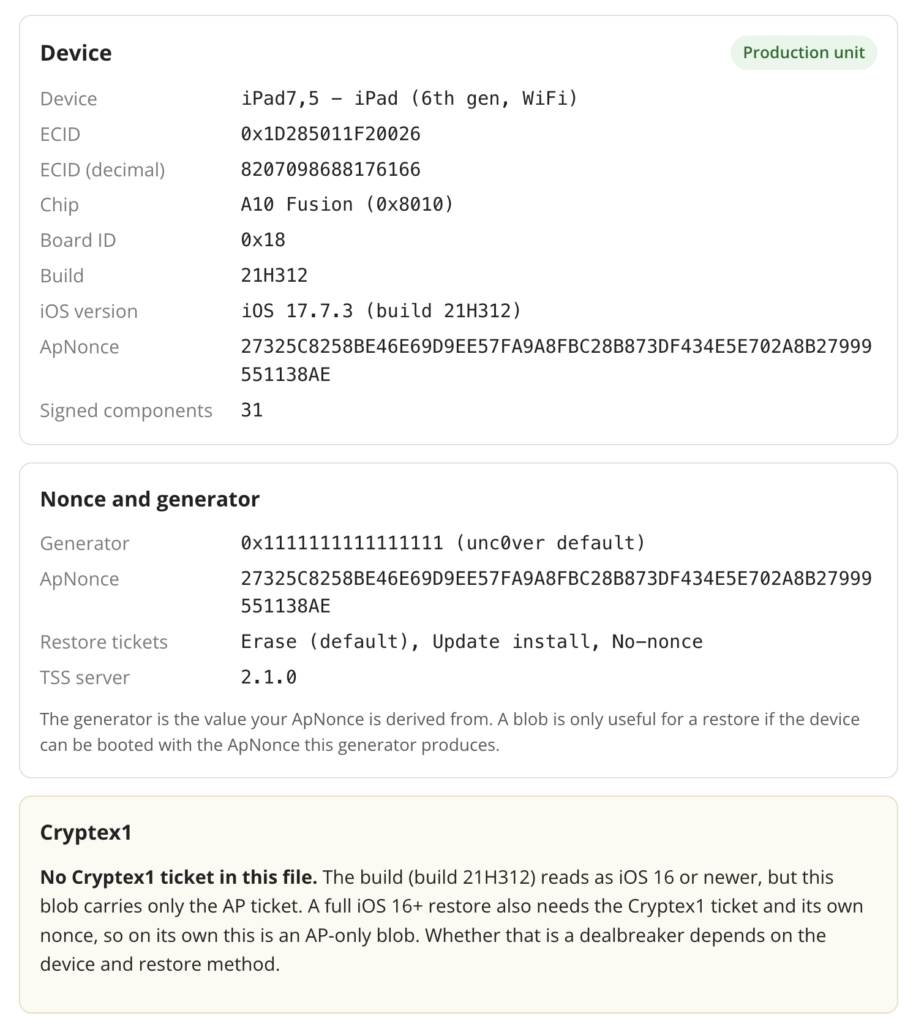
Most of the fields are self explanatory once you have the background above: device, ECID in hex and decimal, chip, board, build and version, the ApNonce, and whether the unit is production or development fused.
The generator is labeled if it is one of the known ones. The restore tickets line tells you which install types the blob covers, erase, update, or the no nonce variant. And the components count is how many firmware pieces the AP ticket signs.
The two lines that decide everything are Cryptex1 and the downgrade outlook. If the tool says the blob is AP only, that is the sentence to stop on. It means you saved half of what a modern restore needs.
The AP side is fine, the Cryptex1 ticket is missing, and without it that blob cannot bring an iOS 16 or newer device back to this version no matter how good the chip is.
The outlook then tells you, based on your exact chip, whether saving that missing half is even worth doing.
How about FutureRestore?
Saving blobs and using them are two different problems. futurerestore is the tool that takes your saved blobs and restores an unsigned firmware, and for cryptex era devices it has been unreliable, failing to fetch the Cryptex1 ticket during restore.
The SEP exploit work that unlocks arbitrary version restores on A9 to A10X was still in progress when this was written.
Yes, some of the blobs CANNOT yet be used. Save them now anyway while your version is signed, because you cannot go back and save them later, and check the current state of the tooling before you count on a restore actually completing.
Who wrote this
I am GeoSn0w of iDevice Central. I work in iOS security research and reverse engineering and have over 11 years of experience with Jailbreaking and iOS internals.
I built this checker because the single most common mistake I see is someone saving an AP only blob for an iOS 16+ device and believing they are covered, then getting angry when it inevitably fails to downgrade.
If something here is out of date, and in this corner of the scene things move quickly, tell me and I will correct it.


