Hello everyone, GeoSn0w here! There are times when you need to take a closer look at the address space of your Arduino development board.
Small sketches may or may not cause memory problems depending on the Arduino board you have, but a fairly complex project can easily chew through the SRAM available.
Multiple allocations and deallocations using malloc() and free() may result in memory issues because the available free chunks may not be big enough to hold what you are about to allocate.
In situations like these, it is recommended to keep an eye on the memory, the way data is positioned, and how you can optimize it.
A matter of memory
As you probably know, Arduino boards, especially the AVR ones do not come with an awful lot of memory. They are intended for relatively small projects (or very well optimized ones, which is the beauty of working that close to the hardware).
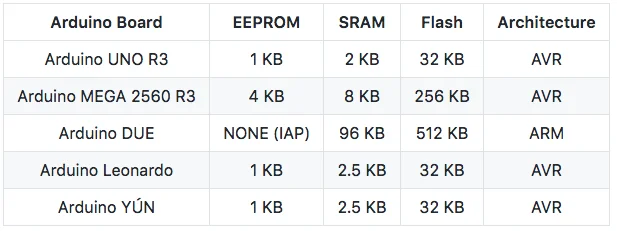
To better illustrate the memory problems that can occur, I have made the following table containing the built-in SRAM, EEPROM, Flash, and the architecture of the most common Arduino boards.
Playing around with Arduino Memory
Now that it is clear that Arduino’s SRAM is nowhere near enough for beefy projects, let’s see how we can peek into it, optimize it, and have fun with it.
This may be obvious for some people, but just in case, when talking Arduino (especially the lower-end models with less than 4 KB of SRAM), you should avoid excessively using malloc() and free().
It is usually better, if possible, to avoid dynamic memory allocation on Arduino. If the sketch is big enough, after enough allocations and deallocations, the memory can become fragmented, and further allocations may fail because there is not enough memory available.
The thing is, there might still be enough memory, but not grouped into free chunks big enough for the allocation to proceed.
I know that this whole memory concept may sound confusing for beginners, so I will try to build a diagram that should be able to demonstrate how this phenomenon occurs.
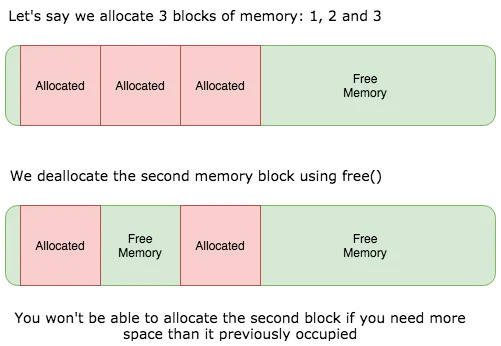
As you can see, multiple allocations and deallocations can result in free chunks in between allocated chunks. These free chunks can still be used if what you want to allocate is smaller than or equal to the size of the free chunk.
If it is bigger, the allocation will seek a bigger free chunk. In the diagram, which is in the right corner after the third allocated block.
If you allocate and deallocate a bit more, it will quickly build free chunks that may not be big enough, which makes the allocation fail.
What can you do?
Depending on what kind of project you want to create, you may find the following good practices useful.
If you are working with strings (char arrays), you may want to use the F() macro. To do that, you transform your code from:
setup(){
  Serial.print("Hello my name is George and I like to code.");
}
Code language: C++ (cpp)
Into:
setup(){
  Serial.print(F("Hello my name is George and I like to code."));
}
Code language: C++ (cpp)
The F() macro places your string in Flash (code space) instead of putting it in SRAM. The amount of Flash your Arduino has is much larger than the amount of SRAM, so that makes sense.
The way F() does this is quite complex, but I will summarize it. For this example, I will take the Arduino Mega 2560 which uses the AVR architecture. The AVR architecture is a Harvard Architecture, so the code and the data are stored separately.
Normally, when you call functions like print() or Serial.print(), you pass a char* to them. This is the address of the character array holding your string in SRAM.
However, if you try to dereference a char*, the system will attempt to return the character stored in the Data Space (SRAM) instead of Flash.
What F() does is pass a __FlashStringHelper* instead of a char*, which points the function to the correct location in code space.
This saves you quite a lot of memory. You can test this yourself. If you have an Arduino UNO, try creating several character arrays holding medium-sized sentences. You will see how much memory they consume. After that, use the F() macro and spot the difference.
Keep in mind that once you put your data on Flash, you cannot modify it at run-time. This is only recommended if the data is constant.
Another good tip for memory optimization is to take advantage of PROGMEM for your constants. If you have a lot of constants, PROGMEM does wonders because it prevents the data from being copied to SRAM at boot time. All you need to do is include the correct header:
#include <avr/pgmspace.h>
Code language: C++ (cpp)
And use it:
const char hello[] PROGMEM = {"My name is George and I like to code Arduinos"};
Code language: C++ (cpp)
The official Arduino Documentation is very useful if you want to get started with PROGMEM for your constants.
It’s important to mention that PROGMEM is only useful in the context of AVR Arduinos like UNO, MEGA, etc. Once you cross into the ARM territory, it’s a completely different animal.
Maybe get into local variables?
Let’s assume this code:
int begin = 64;
void printNumbers(int beginNo){
  int firstNumber = 4;
  int secondNumber = 45;
  float thirdNumber = 4.43;
  Serial.print(firstNumber);
}
setup(){
  Serial.begin(9600);
  printNumbers(begin);
}
Code language: C++ (cpp)
When you call a function, for example printNumbers(int beginNo), the function creates its own Stack Frame.
What does it contain? Everything you pass to the function (its parameters) and all local variables declared within the function’s scope.
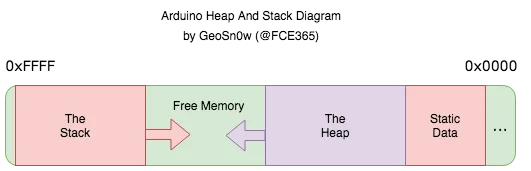
This makes the Stack grow toward the Heap. Everything declared inside the function can only be used inside that scope.
This means that an external function will not be able to use any of the integers or the float declared inside the function.
These variables will only live as long as the function is running. Once the function finishes, its stack frame is popped off the stack, and the space utilized by the function and its variables is reclaimed.
There is still a problem. If you grow your stack too much toward the heap, you run the risk of smashing them into each other, so be careful. Do not build useless variables that do not get used.
To help illustrate the memory map and how the Stack and the Heap look, I built another diagram.
Obtaining the address of a variable in the memory
Arduino, like other systems, places each variable at a specific address in memory so it can be retrieved and used when needed. The addresses are represented in hexadecimal and prefixed by 0x. For example, 0x21D8 is currently the address of a variable I created.
On systems like computers, phones, and tablets, most operating systems use ASLR which stands for Address Space Layout Randomization.
This puts the data and code segments at different locations in memory every time the device boots or the program starts.
The idea is to make it harder for a hacker to know where things are in memory. Of course, that is in theory.
In real life, ASLR can be defeated by finding an info leak. If you can leak a pointer, you can calculate the ASLR slide and, with that, the randomized position of each function or variable you want to patch. You can get these from crash logs, reading restricted memory with exploits, etc.
Kernels like XNU, Linux, and Windows also implement this at the kernel level, and it is called kASLR. The theory is the same. Randomize the kernel in memory to prevent a hacker from easily locating the function he wants to exploit.
Leak a kernel pointer, calculate the slide, and use a disassembler like Hopper, Radare2, or IDA Pro to gather the unslid address of the function you are interested in, and you have defeated kASLR.
Arduino does not implement ASLR. The address space is not randomized, but the location of your variables can change from one flashing to another.
On Arduino, the easiest way to obtain the address of a variable or a function is to use pointers. Let’s assume this code:
int helloWorldFunction(){
  Serial.print("Hello world");
  return 0;
}

int getAddressOfFunction(){
  int (*functionPointer)(void) = &helloWorldFunction;
  Serial.print("The address of the helloWorldFunction() is 0x");
  Serial.print((int) functionPointer, HEX);
  return 0;
}

setup(){
  Serialbegin(9600);
  helloWorldFunction();
  getAddressOfFunction();
}
Code language: C++ (cpp)
This code will happily print the address where helloWorldFunction resides in memory. To get the address, we use the & operator.
The pointer can point to a function that returns an int and has no parameters. We also need to cast the pointer to int when we print it. The HEX argument tells the system that we want to print the value in hexadecimal format.
Peeking into the memory
If you want to obtain the address of the Stack Pointer and the Heap Pointer, it is pretty simple. Let’s assume this code:
uint8_t * HeapPointer, * StackPointer; // Globally declaring the Stack and Heap pointers.

int getPointers(){
  StackPointer = (uint8_t *)malloc(4); // We do a small allocation.
  HeapPointer = StackPointer; // We save the value of the heap pointer.
  free(StackPointer); // We use free() to clear the StackPointer.
  StackPointer = (uint8_t *)(SP); // Get the Stack Pointer.
  return 0;
}

setup(){
  Serial.begin(9600);
  Serial.print("0x");
  Serial.print((int) StackPointer, HEX);
  Serial.print("0x");
  Serial.print((int) HeapPointer, HEX);
}
Code language: C++ (cpp)
The code above should print the Stack Pointer and the Heap Pointer. The code is inspired from the Arduino Forums with some small modifications.
I hope this write-up helps. It took me a while to put it together, but I hope it comes in handy for somebody one day.
If you want this converted into a Gutenberg block layout, with tables, callouts, or code-highlighting classes, just say so.
Originally written on: April 21st, 2018, on my original GitHub blog.


